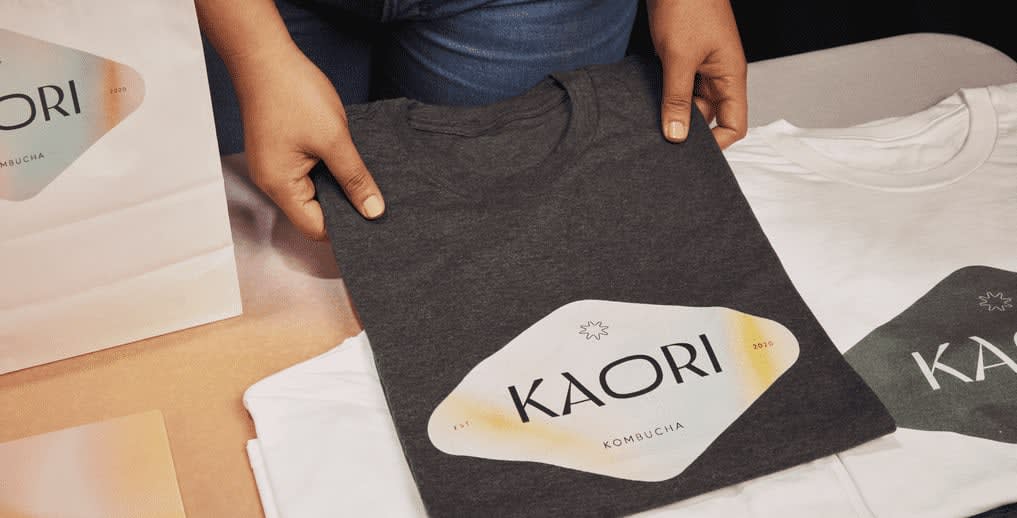
Printing your logo on a T-shirt is a simple, affordable way to promote your business. Custom T-shirts can help create a consistent look for your team, support your marketing efforts and build brand recognition. Before you place your order, it’s worth taking a little time to prepare your design. A few simple decisions, like choosing the right file format, print method and logo placement, can make a big difference to how your finished T-shirts look.
This guide walks you through everything you need to know to print your logo with confidence, from preparing your artwork to choosing the right printing method and logo placement.
- The best T-shirt printing method depends on your logo design, fabric and order size, with direct-to-garment suited to detailed artwork and screen printing offering better value for simpler, larger runs.
- Vector files like SVG, EPS and PDF produce the sharpest prints, while a high-resolution PNG with a transparent background is the best alternative.
- Prepare your logo before you print by checking the file format, logo colors, size and placement to prevent common printing mistakes.
- Different fabrics work better with different printing methods, making it worth matching your garment to your design and how you plan to use it.
- Choosing the right print method can also help keep costs down as your order size grows.

Choosing your printing method: DTG vs. screen printing
Selecting the right print method depends on your logo design, the fabric you’re printing on and how many shirts you need. Direct-to-garment (DTG) is a good choice for detailed, full-color designs and smaller orders, while screen printing offers better value for simple logos in larger quantities.
The printing method makes a big difference on how your finished T-shirt looks and lasts. Here’s a quick look at the most popular options and when to use them:
Direct-to-garment (DTG) printing
DTG acts much like a traditional inkjet printer, applying specialized ink directly into the fabric’s fibers. It is ideal for small order quantities and complex designs featuring multiple colors, fine gradients or even when you want to print a photo on a T-shirt. DTG works best on cotton and other natural fibers because they absorb the ink well, helping detailed designs look sharp and vibrant.
Screen printing
This method is best suited for bulk orders (typically 24 items or more), screen printing pushes ink through a woven mesh stencil. Screen printing works well on cotton and cotton-blend T-shirts, making it a reliable choice for uniforms, promotional apparel and large event order. If your business logo features one or two solid colors without gradients, this is the most cost-effective and vibrant option. Because the setup cost is spread across more garments, screen printing becomes more cost-effective as order volume increases.
Embroidery
For a premium, corporate aesthetic, often used on polos or heavier cotton, embroidery uses colored threads stitched directly into the garment. Keep in mind that highly intricate or overly large logos may pucker lighter-weight fabrics.
Heat transfer
A great option for synthetic fabrics, activewear or when you need to create custom sports clothing, heat transfer uses pressure and heat to bond a vinyl design to the material. Because it adheres well to polyester and performance fabrics, it’s a popular option for sportswear and activewear that may not be suitable for every printing method.
For a deeper dive into these techniques, explore our guide to custom T-shirt printing, embroidery and design.

How to format your logo file to prevent printing errors
Spending a bit of extra time on proper file preparation is the difference between a crisp, professional shirt and a blurry, unwearable mess. Always use high-resolution vector files and enable transparent backgrounds before sending your design to print.
To prevent a blurry print or an accidental solid white box from appearing around your design, save your business logo as a vector file (such as SVG, EPS, or vector PDF) with an explicit transparency layer enabled.
How to use transparent backgrounds in T-shirt design
One of the most common mistakes people make is uploading a JPEG version of their logo. JPEGs do not support transparency, meaning the design platform will print the solid white box behind your logo directly onto your colored T-shirt.
To avoid this, always save your logo with a transparent background. If you do not have a vector file (SVG or EPS), use a high-resolution PNG file saved at 300 DPI (dots per inch) with the transparency channel selected.
The step-by-step guide to printing your logo on a T-shirt
Printing your logo on a T-shirt is straightforward once you know what to look for. Following these steps will help you prepare your artwork, choose the right T-shirt and avoid common printing mistakes before you order.
- Step 1: Finalize your file format. Confirm your logo is saved as a vector file or a 300 DPI PNG with a transparent background.
- Step 2: Select your garment. The fabric dictates the fit and the print quality. Standard 100% cotton is perfect for DTG and screen printing, but if you are outfitting an active team, you might want to explore which T-shirt material is best for the gym. Don’t forget to consider the overall style, including different T-shirt necklines that match your brand’s aesthetic.
- Step 3: Choose your colors. High contrast is key. Pair dark logos with light shirts, or utilize bright T-shirt color combinations to make your branding pop.
- Step 4: Determine placement and sizing. A standard left-chest logo requires different scaling than a full-back print. For a deep dive into exact measurements and visual examples, our comprehensive T-shirt design placement guide and our breakdown of standard T-shirt design sizes are useful places to start.
Taking the time to prepare your logo before you order can make a big difference to the finished result. With the right file, T-shirt and placement, you’ll be well on your way to creating custom apparel that looks professional and represents your brand with confidence.

Legal and trademark compliance checklist
Before you print your logo, take a few minutes to make sure you have permission to use every part of your design. It’s a simple step that can help you avoid legal issues, especially if you’re creating merchandise to sell or ordering apparel for your business.
- Original artwork: Make sure your logo is your own original design and doesn’t copy or closely resemble another brand’s logo.
- Font licenses: If your logo includes a licensed font, check that your license allows it to be printed on merchandise or products for resale.
- Third-party content: Only use images, slogans or mascots you own or have permission to reproduce in print.
Ordering tips for custom business T-shirts
Once your design is ready, a few final checks before you place your order can help prevent common issues like incorrect sizes, artwork mistakes and last-minute delays. Planning ahead also makes it easier to reorder in the future as your business grows or your team changes.
- Review your artwork before ordering: Double-check your logo placement, colors and sizing before approving your design. It’s much easier to spot a small issue on screen than after your T-shirts have been printed.
- Plan your quantities carefully: Think about the sizes, colors and styles you’ll need before placing your order. If you’re ordering for employees, consider future hires too so it’s easier to reorder and keep your branding consistent.
- Check production and delivery timelines: If your T-shirts are for a trade show, product launch or company event, review your production and shipping options before ordering so you can choose a timeline that works for your schedule.
- Consider ordering a sample: If you’re trying a new logo, garment or print method, ordering a sample first lets you check the look and feel before committing to a larger order.
- Choose products that support future orders: If you expect to reorder throughout the year, selecting a style that’s available in the sizes and colors your team needs can make it easier to keep your branding consistent over time.
Cost of printing a custom T-shirt
The cost of printing a custom T-shirt depends on your print method, design and the number of shirts you order. Choosing the right option for your project can help you get the best value without compromising on quality.
If you’re ordering T-shirts for a large event or promotional giveaway, screen printing usually offers the lowest cost per shirt as your order grows. If you only need a handful of shirts for your team or want to test a new design, DTG is often the more cost-effective choice because there’s no screen setup required.
For a closer look at pricing and what affects it, explore our guide to T-shirt printing costs.

Source: Vintage logo design on a yellow T-shirt by Jose Antonio Varela via 99designs by Vista
Washing and longevity instructions
A well-made custom T-shirt can keep promoting your business long after it’s first worn. Taking care of your printed apparel helps protect the design, extend the life of each shirt and maximize its value over time by keeping your logo looking its best.
To help reduce fading, cracking and peeling:
- Turn the garment inside out before washing to protect the printed design from friction.
- Wash in cold water on a gentle cycle.
- Avoid bleach and strong fabric softeners, which can damage DTG prints and heat transfers over time.
- Air dry or tumble dry on the lowest heat setting. High heat is one of the main causes of cracked or peeling prints.
Printing your logo with confidence
Printing a logo on a T-shirt starts with choosing the right file format, print method and placement for your design. Taking the time to prepare your artwork, select the right garment and review your order before printing can help you avoid common mistakes and create custom T-shirts that look professional from the start.
Whether you’re creating uniforms for your team, promotional merchandise or apparel for an upcoming event, a little planning goes a long way. With the right preparation, you’ll be ready to create custom T-shirts that represent your brand with confidence.
FAQs about how to print a logo on a T-shirt
How big should a T-shirt logo be?
Standard left-chest logos are usually 3 to 4 inches wide, while full-front designs are often 10 to 12 inches wide, depending on the size of the shirt, the logo proportions and the available print area.
What is the best placement for a logo on a shirt?
The center chest is best for bold, highly visible brand statements (like event tees), while the left chest offers a subtle, professional look ideal for corporate uniforms and retail staff.
Should I choose screen printing, embroidery or DTG for my business logo?
If your logo features fine gradients or you only need a few shirts, choose DTG. If it is a solid 1-to-2 color corporate logo and you need a bulk order, choose screen printing. For a premium, textured look on polos or heavier fabrics, select embroidery.

