
Business cards may be small, but that doesn’t mean you have to squeeze everything onto one side. While your logo, business name and essential contact details usually belong on the front, the back of your business card gives you extra room to be creative or practical.
From QR codes and loyalty rewards to appointment reminders and care instructions, there are plenty of ways to make that space work harder for your business. Here, we’ll share ideas for the back of a business card, along with tips for choosing the right paper, designing for smaller cards and finding out what’s working for your customers.
Top 6 ideas for the back of a business card
1. Dynamic QR code
Best for: Booking pages, portfolios and online contact details
Primary benefit: Gives customers a quick way to take the next step
Layout tip: Give your QR code plenty of clear space around it and use strong contrast for easy scanning
2. Appointment or loyalty tracker
Best for: Salons, wellness businesses and local services
Primary benefit: Gives customers a useful reason to keep your card
Layout tip: Choose a writable paper stock if you’ll be adding dates, notes or stamps
3. Care checklist
Best for: Trades, food businesses, beauty services and handmade products
Primary benefit: Keeps helpful information close at hand
Layout tip: Stick to a few short tips that are easy to scan
4. Social media details
Best for: Retailers, makers and creative businesses
Primary benefit: Helps customers find and interact with you online
Layout tip: Pair your handle with a simple prompt, such as asking customers to tag you in their photos
5. Customer testimonial
Best for: Consultants and service-based businesses
Primary benefit: Lets a happy customer speak for your business
Layout tip: Keep it to one short quote so the design doesn’t feel crowded
6. Local map
Best for: Shops, cafés, studios and other local businesses
Primary benefit: Makes it easier for customers to find or revisit you
Layout tip: Keep your map simple and consider adding a QR code for directions or reviews
- Give the back of your card one clear purpose rather than trying to fill every inch of space.
- If you’re adding a QR code, make sure it’s large enough to scan, has good contrast and has clear space around it.
- Planning to write appointment times or add loyalty stamps? Choose a paper finish that’s easy to write on.
- With mini business cards, keep things especially simple. One QR code, social handle or short message may be all you need.
Should you use the back of a business card?
You don’t have to fill the back of every business card. A beautifully designed blank space can work well if a minimal look suits your brand. But if you have something useful to share, printing on both sides gives you more room without making the front feel crowded.
You could use that extra space to share a discount, help customers find you online, remind them about their next appointment or simply add a little more personality to your design. Before deciding what goes where, think about the essential information to include on a business card, then decide what would be most useful on the back.
Single vs. double-sided printing: Cost vs. impact
A single-sided card may be all you need if your main goal is simply to share your contact details. But if the back can encourage another action like booking an appointment, claiming an offer or visiting your website, double-sided printing may give you more value from each card you hand out.
Think about the purpose of the second side before you spend more. You can also explore business card costs to find an option that works for your budget.
11 creative ideas for the back of a business card
The best design doesn’t necessarily include the most information. Instead, think about what would be genuinely useful, interesting or memorable to your customers. Here are 11 ways to put that extra space to work.
1. Add a dynamic QR code
A QR code can connect a small printed card to a lot more information online. Send customers to your booking page, digital contact card, portfolio, menu or social profiles without squeezing a long URL onto your design.
For reliable scanning, try printing your QR code at least 0.8″ x 0.8″ (20 mm x 20 mm), using a dark code on a light background and leaving around 0.2″ of clear space around it. Avoid placing other text or design elements too close to the code.
Dynamic QR codes can be particularly useful because you can change the destination later without reprinting the card. Some also let you track scans, which can help you understand how often people are using it.
Add a few words explaining what will happen when someone scans, such as “Book an appointment” or “See our latest work.”

2. Share useful information
Sometimes the best reason to keep a business card is that there’s something genuinely helpful on it. Think about the questions your customers regularly ask and whether the answer could fit neatly on the back.
What you include will depend on your business:
- Beauty and wellness: Share a few simple aftercare or maintenance tips.
- Trades and home services: Add seasonal maintenance reminders or basic safety information.
- Food and beverage: Include reheating instructions, an allergen key or serving suggestions.
- Retail and handmade goods: Add care instructions for jewelry, candles, clothing or other products.
Keep the information short and focused. Your business card should be a handy reminder, not an instruction manual.
3. Offer a reward
Give customers another reason to hold onto your card by turning it into a small reward. For businesses that rely on repeat visits, a simple stamp or punch grid can double as a loyalty card.
Another option is a card-only offer for new or returning customers. Whatever you choose, make the reward and any terms clear at a glance. A straightforward “Bring this card for 10% off your next purchase” is much easier to understand than several lines of small print.

4. Get social
If social media is an important part of your business, the back of your card is a natural place to share your handles. This also leaves more room on the front for your logo and essential contact information.
Shop CXDSN (@_cxdsn), for example, uses its card to point customers toward its social presence. You can go one step further with a simple prompt: ask customers to tag you in photos, use a branded hashtag or share their purchase.
Keep things focused on the platforms you actually use rather than listing every account you own. See more tips for using social media icons on business cards and including Instagram on your business card.

5. Spotlight a customer testimonial
A kind word from a happy customer can say a lot in a small amount of space. This can work particularly well for consultants and service-based businesses where trust plays an important role in choosing who to work with.
Choose one short, specific testimonial and let it breathe. You could pair it with a small headshot or star rating if that suits your brand, but don’t add so many elements that the quote gets lost.
6. Add something unexpected
The back of your business card doesn’t always have to sell something. A small surprise can show some personality and make your card a little more enjoyable to keep.
A restaurant could share a mini recipe, a creative studio could add a playful quote or an independent maker could include an unexpected fact about their craft. Choose something that feels connected to your business rather than adding content simply to fill the space.
7. Show off your slogan
Have a tagline that sums up your business perfectly? Give it some room to shine.
Kristi Frank of Clutch Creations turns her slogan into a repeating pattern across the back of her business card. It’s a simple way to reinforce a brand message while creating a bold graphic design without adding more contact information or sales copy.

8. Remind customers about their next appointment
For salons, beauty businesses, dental practices, pet groomers and other appointment-based services, the back of a business card can double as a handy reminder card.
Add a simple space for the date, time and perhaps the name of the person your customer is seeing. Just remember that your paper choice matters here. If you need to write on the card, look for an uncoated, matte or other writable finish that works well with your chosen pen or pencil.
9. Thank your customers
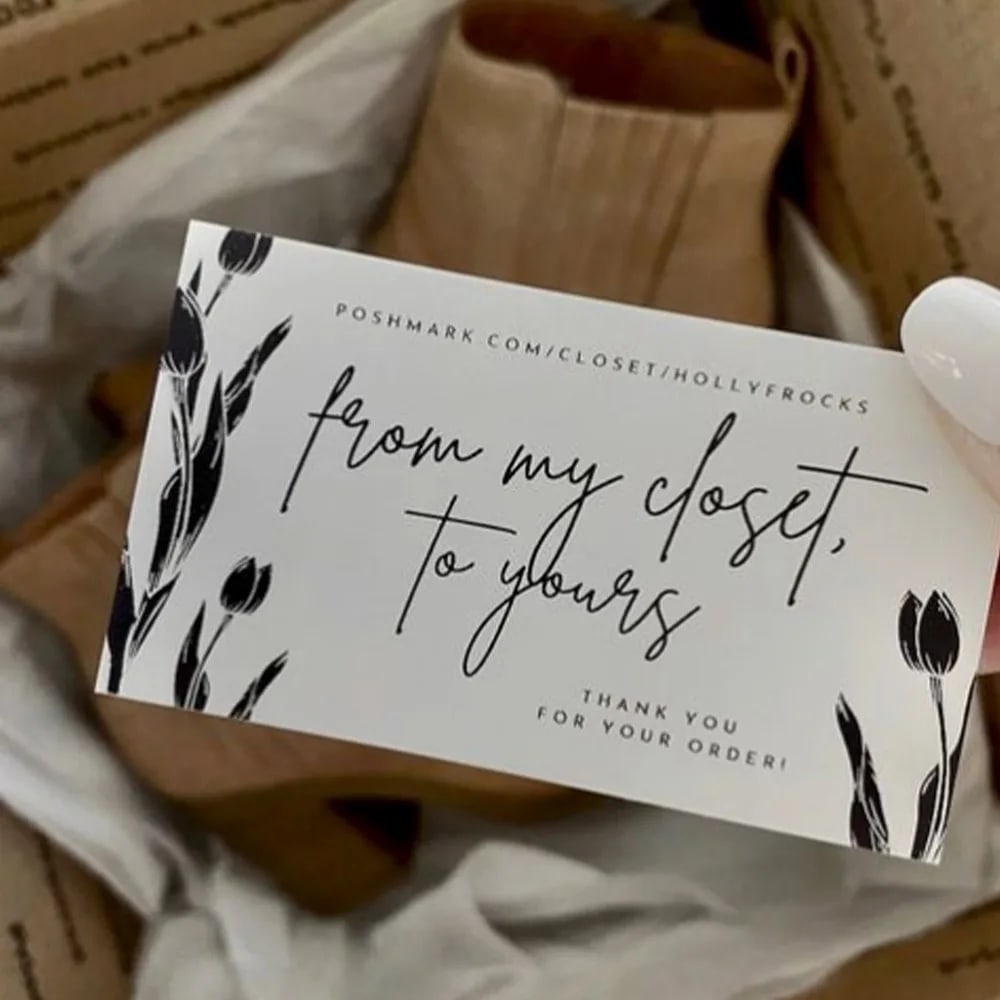
A simple thank-you can make an order feel more personal. If you sell online, try adding your business card to packages with a short message on the back.
Boutique business By Holly (@hollyfrocks) uses cards as thank-you notes in customer orders. You could keep yours as simple as “Thanks for supporting our small business,” or add your name or a short message that feels true to your brand.
10. Include a map of your location
If customers visit you in person, a small map can make your card genuinely useful. This is particularly handy if your shop, studio or office is tucked away, inside a larger complex or tricky to spot from the street.
Keep the map simple by highlighting the most recognizable streets, landmarks or parking areas. You could also add a QR code that opens directions on a customer’s phone, making it easy to switch between the printed map and digital directions.
11. Tell customers your story
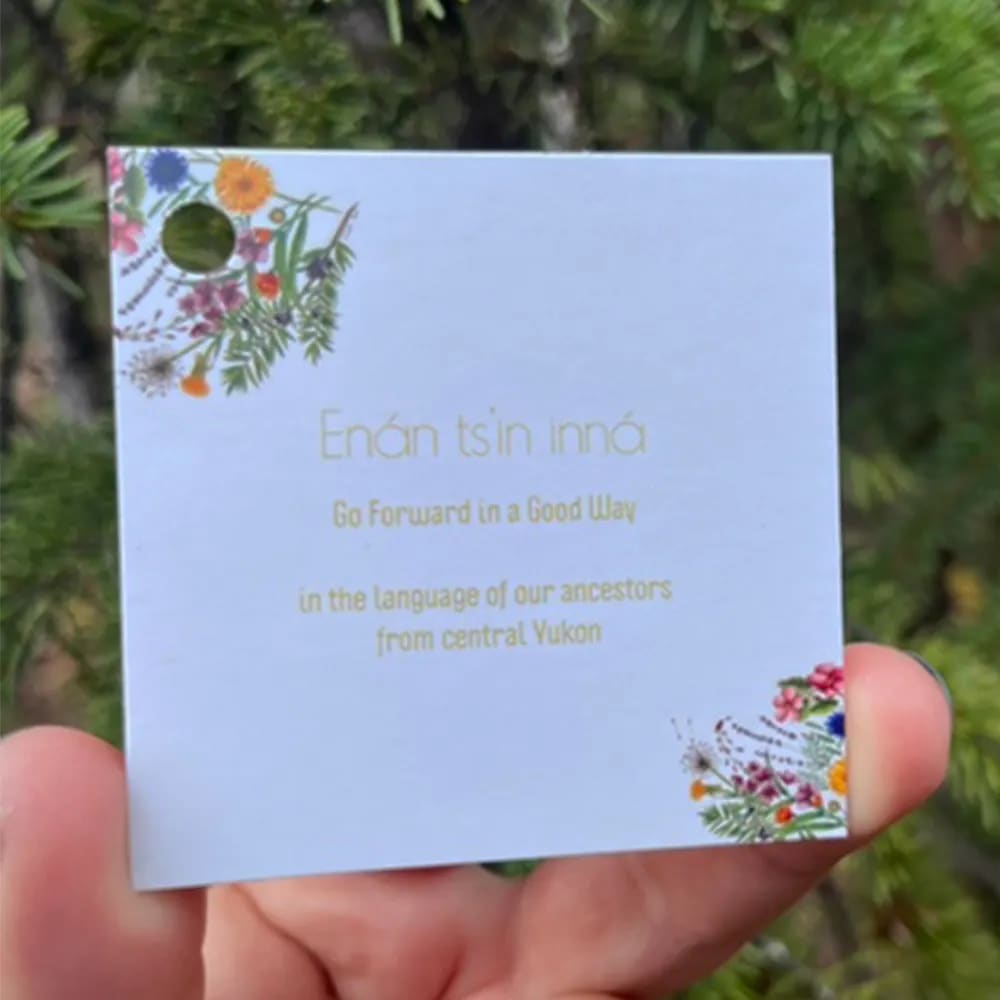
If the story behind your business is an important part of your brand, the back of your card can give customers a quick introduction.
Yukon Soap Company (@yukonsoapscompany), for example, uses its square business cards to share a little about its heritage and values. Keep your version short; one or two sentences about why you started, what you make or what matters to your business is plenty.
Mini business card design: Tips for a smaller canvas
Mini business cards, typically around 2.75″ x 1.1″, give you less room to work with, so every element needs a purpose. Instead of shrinking a standard business card design to fit, simplify the idea itself.
Start by choosing one main focus for the back. That could be a QR code, social handle, logo or short slogan. Trying to combine several of these can quickly make a mini card feel cramped.
Keep text readable, too. We recommend staying around 7–8 pt at an absolute minimum, although larger type will usually be easier to read when space allows.
Finally, give everything enough breathing room. Keep important text and logos safely away from the trim area and follow the print specifications for bleed. A little empty space can make a small design feel much clearer and more considered.

Choosing a paper stock and finish for the back of your card
Your paper choice isn’t just about how your business card looks and feels. Think about what you want people to do with it, too.
If you’ll be writing appointment times, adding loyalty stamps or jotting down notes, look for an uncoated or other writable paper option. Matte and textured finishes may also suit some designs, but check the product specifications if writing on the card is important to you.
Glossy and coated finishes can be a great choice when bold colors, photography or a polished finish are the priority. They can be harder to write on cleanly, though, so they may not be the best match for an appointment or loyalty card.
In other words, design the back of the business card and choose the paper together. A beautiful finish isn’t much help if it doesn’t suit the job you’ve given it.
How to tell if the back of your business card is working
You don’t need complicated analytics to find out whether your business card is encouraging people to take action. A few simple tracking methods can give you a better idea of what customers are responding to.
Track QR code scans
If you’re using a dynamic QR code, your provider may let you see how often it has been scanned and when people are engaging with it.
Use a card-specific offer
A unique discount code, such as CARD10, makes it easy to see when an order or visit came from your business card. You can use the same idea with a dedicated URL.
Ask your customers
Sometimes the simplest method is the most useful. If someone books, visits or places an order, ask how they found you. Over time, you may start to see which printed materials are helping people come back.
How to design the back of your business card: Best practices and tips
Before you send your design to print, run through this quick checklist:
- Give the back one clear purpose or focal point.
- Keep strong contrast between your text and background so everything is easy to read.
- Aim for at least 8 pt body text on standard cards and go larger when your design allows.
- If you’re using a QR code, we recommend a minimum size of 0.8″ x 0.8″ (20 mm x 20 mm) with around 0.2″ of clear space around it.
- Choose a writable finish if you’ll be adding appointment times, notes or loyalty stamps by hand.
- Check that the front and back feel like part of the same design, even if they serve different purposes.
- Always proofread your details and test QR codes before sending your cards to print.
Make the back of your business card count
You don’t need to fill every inch of your business card to make good use of it. Start by thinking about the one thing you’d most like someone to do, remember or keep after you hand them your card.
Could a QR code make booking easier? Would customers appreciate a reward scheme? Or would a simple thank-you feel more like your brand? Once you know what job you want the back to do, the design becomes much easier.
Frequently asked questions
What should I put on the back of my business card?
Choose something that complements the information on the front and gives customers a reason to look twice. A QR code, appointment reminder, loyalty reward, social handle, testimonial, care instructions or simple thank-you message can all work well.
Is it bad to leave the back of a business card blank?
Not at all. Leaving it blank can suit a clean, minimal design. But if you have useful information, an offer or a clear next step to share, the back gives you extra space without overcrowding the front.
Should a QR code go on the front or back of a business card?
Either can work, but the back is often a good choice if you want to keep the front focused on your logo, name and essential contact information. Wherever you place it, make sure there’s enough space around the QR code and test that it scans before printing.
Can you write on glossy business cards?
Glossy and coated cards can be more difficult to write on cleanly than writable or uncoated stocks. If you’ll regularly add appointment times, notes or loyalty stamps, choose a finish designed with writing in mind.
Is it bad to print on the back of a business card?
The opposite. Printing on both sides can give you useful extra space for a QR code, offer, appointment reminder or other information, while keeping the front of your card clear and easy to read.

