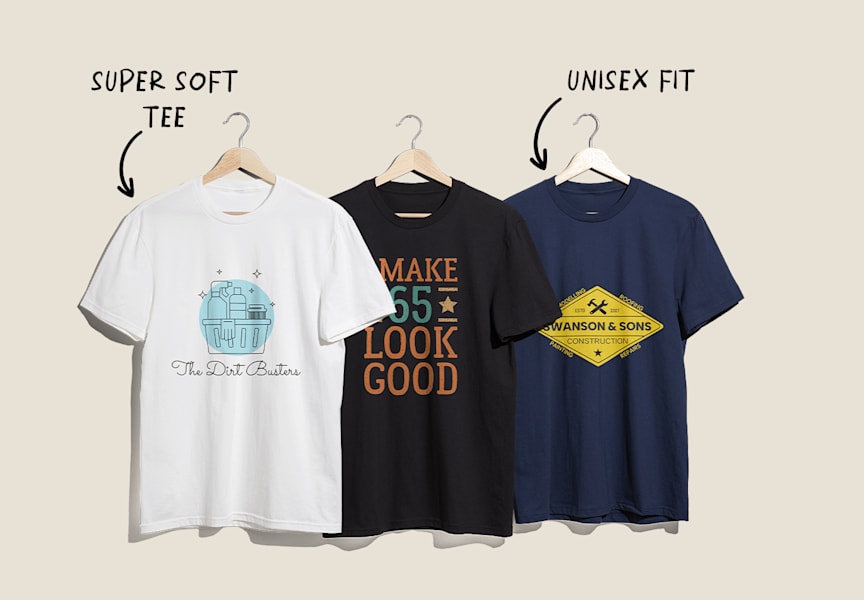
Whether you’re looking to promote your brand, increase brand awareness, generate extra revenue or create gifts, there are many reasons to print custom T-shirts. In this article, you’ll learn how to print T-shirts like a pro in seven easy steps, because you don’t need technical knowledge to get good results. We’ll help you determine your quantity and budget, select a printing method, choose the right T-shirt fabric and avoid common mistakes so you get professional-quality results and create T-shirts people actually want to wear.
- T-shirt printing methods include screen printing, direct-to-garment (DTG), vinyl graphics, heat transfer and embroidery. The best printing method depends on your design, budget and quantity.
- When it comes to budget, more colors or complex designs increase printing costs. Larger print runs usually help save money per item.
- To print a T-shirt, you need to create the design, choose a printing method, place your design on the T-shirt, prepare the artwork files and proof before printing.
- Quantity and budget determine the printing method, design complexity, fabric and T-shirt style.
Step 1: Create your T-shirt design
Make sure your T-shirt design is aligned with your brand, event or audience. Start by asking yourself what you want the shirt design to say about your brand. Who is the target audience you’re trying to appeal to? Whether it features a graphic, logo or slogan, take time creating a T-shirt design that reflects your brand identity.
Then ask yourself: Does it have the right proportions? Do the colors work well together? Is the text legible?

Designs behave differently on fabric than they do on a screen, while the printing method you choose will affect how colors and textures appear printed on a T-shirt.
Design considerations to keep in mind:
- Contrasting design and shirt colors: Dark-colored artwork can disappear on dark T-shirts, while light artwork will be less visible printed on light-colored fabrics.
- Avoid thin lines or tiny text: Small elements or thin lines can lose clarity during printing.
- Keep the color palette minimal: Designs with fewer colors are easier and more cost-effective to print.
- T-shirt design placement: Place smaller designs on the chest and larger graphics on the back.
- Create artwork that scales cleanly: Vector graphics maintain sharp edges no matter what scale the design is printed at.
Read our guide to how to design a T-shirt, which covers everything from how to pick the right style, imagery, colors and typography. Many printing platforms, including VistaPrint, offer customizable templates for you to personalize.
Step 2: Know your quantity and budget
Next, figure out your estimated quantity and budget. As with most types of printing, ordering in bulk lowers the cost per item. Bulk orders often make the most sense if you plan to sell the T-shirts as merch or give them away at events.
The quantity you print will depend on how the T-shirts will be used. For example:
- Bulk orders work well for branded merchandise or event giveaways.
- Smaller print runs are best when testing a new design, small business employee uniforms, producing limited editions or for a small one-off event.
- Reorder T-shirts once you know there is demand for a design.
As well as quantity, think about which sizes and how many of each size you will need. If you’re printing merch, some sizes will be more popular than others, but it’s important to offer an inclusive range. Depending on your manufacturer or printing partner, certain sizes may also cost slightly more.

If you’re printing T-shirts for a specific campaign, event or product launch, plan ahead so everything arrives on time. It helps to think through these practical considerations early on:
- Timeline: Printing and shipping times vary depending on order size.
- Distribution: Will your T-shirts be sold online, handed out at events, given to employees or customers?
How much does T-shirt printing cost?
Printing a single T-shirt costs between $15 and $30 USD, but printing in bulk can bring the cost per shirt down to between $5 and $10. Prices for T-shirt printing vary depending on the printing method, the quality of the T-shirts you’re printing on and the quantity you’re ordering.

Source: T-shirt design by noodlemie via 99designs by Vista
Step 3: Choose a printing method
Once you know your quantities and budget, it becomes easier to decide between printing methods. Some techniques are better for high-volume production, while others are better suited to smaller batches or more detailed designs.
When it comes to printing a T-shirt and deciding on the right method, consider cost, appearance, production time and materials. Fabric also matters: some printing techniques work best on 100% cotton, while others perform better on blends or synthetic fabrics. Let’s cover the five most popular T-shirt printing methods.

Screen printing
Screen printing can be done by hand or machine and is the gold standard for T-shirt printing. Individual screens are created for each color used in your design, which allows the artwork to be printed repeatedly with consistent results – making this printing method especially effective for large runs.
Pros: Screen printing is reliable, affordable at scale and produces vibrant, durable prints.
Cons: A new screen is required for every color or design revision, which increases setup costs. Complex, multi-color designs can become expensive for small orders.
Best for: Bulk orders, bold graphics and simple designs with minimal colors.

Vinyl graphics
T-shirts with vinyl graphics are created with transfer printing. A machine cuts the design from colored vinyl sheets, which are then pressed onto the garment using heat. The result has a slightly raised texture and a bold, dimensional look.
Pros: Vinyl produces crisp edges, strong colors and durable results.
Cons: Each design is pressed individually, making this method slower and less cost-effective for large orders.
Best for: Simple graphics, numbers, names or text-based designs in smaller batches.
Direct-to-garment printing
Direct-to-garment (DTG) printing is a newer option that works similarly to inkjet printing. The printer sprays ink directly onto the fabric, allowing for detailed images and smooth color gradients.
Pros: Excellent for intricate artwork, photographs and multi-colored designs. No screens required.
Cons: The cost per shirt is higher for large runs and DTG isn’t suitable for printing on dark fabric.
Best for: Small-quantity orders with detailed, multi-color designs on light-colored cotton T-shirts.

Direct-to-film (DTF)/heat transfer
Direct-to-film printing creates the design on a special film first, which is then transferred onto the shirt using heat and adhesive powder. This method is increasingly popular because it works across many fabric types.
Pros: Handles detailed artwork and vibrant colors well, and works on cotton, blends and synthetic fabrics.
Cons: Transfers are heavier than ink-based printing and less affordable than screen printing for bulk orders.
Best for: Small to medium quantity orders, multi-color artworks and printing on mixed-fabric garments.
Embroidery
Embroidery uses stitched thread instead of ink or transfers. While technically not a printing method, it’s a common choice for branding T-shirts and other apparel when durability and a premium look are priorities. Cost depends on stitch count rather than the number of colors used in the design.
Pros: Highly durable, professional-looking and ideal for small logos.
Cons: Not suitable for large graphics or highly detailed designs.
Best for: Small, one-color logos and premium merchandise.

Choosing the right printing method
The best printing method depends on how many T-shirts you need, how detailed your design is and what type of fabric you’re printing on. Some methods are great for large production runs, while others are better suited to smaller batches or intricate artwork.
This quick comparison table can help you find the right technique for your print project:
| Printing method | Best order size | Design complexity | Fabric compatibility | Cost considerations |
|---|---|---|---|---|
| Screen printing | Medium to large runs | Simple to moderately complex designs | Works well on cotton and blends | Higher setup cost, but lower cost per shirt when printing in bulk |
| DTG (direct-to-garment) | Small runs | Highly detailed, full-color artwork | Best on 100% cotton | Higher cost per shirt; no setup fees |
| DTF/heat transfer | Small to medium runs | Detailed, multi-color designs | Works on cotton, blends and many synthetics | Moderate cost; flexible for mixed orders |
| Vinyl graphics | Small runs | Simple shapes, text or numbers | Works on most fabrics | Cost increases with each color and garment |
| Embroidery | Small to medium runs | Simple logos or branding | Works on most apparel fabrics | Cost depends on stitch count rather than colors |
In general, screen printing becomes more cost-effective as quantities grow, while DTG and DTF are often the better choice for smaller runs or highly detailed designs. Vinyl and embroidery tend to work best for simpler graphics, names or logos.
Choosing your printing partner
As you choose your printer, always keep your timeline in mind to make sure you can have the order ready in time. For an online order, factor in the printing time as well as the shipping time.

Source: T-shirt design by diwaz via 99designs by Vista
The following factors will influence which printer you choose:
- Printing techniques they offer and whether they work for your design
- Cost for plain T-shirts plus printing
- Printing time
- T-shirt styles, sizes, materials and colors they offer
- Quantities you can order
- Support and proof options
Step 4: Choose a fabric, color and T-shirt type
T-shirts should be comfortable, so keep comfort in mind as you explore T-shirt fabric options for your branded apparel. At the same time, the material you choose will directly affect how your design prints, how colors appear and how well the shirt and its design hold up over time.

Source: T-shirt design by Konstantin Kostenko via 99designs by Vista
A popular T-shirt fabric is 100% cotton. It’s versatile, easy to wear and works well with DTG and screen printing, which absorb ink into the fabric for a soft, long-lasting finish.
A cotton-polyester blend is another common choice. It’s affordable, holds its shape and resists shrinking, though prints can appear slightly less vibrant depending on the printing method used.
Synthetic fabrics (like polyester) are typically used for performance wear and work best with transfer-based methods such as DTF.
As a quick rule of thumb:
- Cotton: best for vibrant, ink-based prints (DTG, screen printing)
- Blends: balanced option for comfort, durability and cost
- Synthetics: suited to performance wear and transfer methods (DTF)
Work with your printer to choose a fabric that matches both your design and your printing method.
In addition to selecting a fabric, you’ll need to decide between the different T-shirt styles and types:
- Crew neck: A versatile, everyday option that works for most use cases, from merchandise to uniforms
- V-neck: A more fitted, retail-style choice often used for fashion-forward designs
- Long sleeve: Ideal for cooler climates or higher-value items
- Performance T-shirts: Lightweight, moisture-wicking fabrics suited for sports, events or outdoor use
Think about your audience, goals and intended uses before choosing your T-shirt type.

The base T-shirt color is another decision worth making early on, since printing on darker garments may require an additional base layer, which can affect both the finish and cost. Read our guide on T-shirt color combinations to help you find a color combination that stands out and translates well from screen to fabric.
Step 5: Place your design on the T-shirt
Before printing, you’ll need to decide where your design will be placed on the shirt.
Most printers work with these standard T-shirt design placement options:
- Center chest: A common choice for branded graphics and promotional designs
- Left chest: Best for logos and smaller prints, often on uniforms or branded apparel
- Back: Ideal for larger designs or event T-shirts
- Sleeve: A secondary placement for logos, taglines or event information
You’ll also need to confirm the print size and positioning. Printers typically measure placement from the collar and scale the design based on the garment size. A design that’s too small can look out of place, while one that’s too large may not sit correctly on different sizes.
Step 6: Prepare your artwork files
When you’re ready to print, you’ll need to send your design files to your printer. Check with them about specific file types, color requirements and file sizes. When working with a designer, relay print specifications to your them so they can supply the final print-ready files.
What is the right file format for T-shirt printing?
In most cases, you’ll need to submit your T-shirt design in vector format. This will typically be an AI, PDF or EPS file. Any of these formats will work, but a PDF is the most versatile option. The file format will also depend on the design program used to create the design (such as Adobe Illustrator or InDesign) so you may need to export the file depending on the printer’s requirements.

Before sending your files to print, double-check for:
- Vector artwork for sharp, scalable prints
- 300 DPI resolution if raster images are included
- CMYK color mode for accurate color reproduction
- Outlined fonts to prevent font substitution issues
You may need to provide specific color codes if your printer mixes custom inks. Make sure you include the correct CMYK values so the printed T-shirts match your design as closely as possible.
Step 7: Check your proof and print
Request a proof before sending your T-shirt design to print, especially if you’re placing a bulk order. This can be a digital proof or a test print. This is your last chance to make any changes, so review the final design carefully.
Check:
- Design placement
- Color accuracy
- Text alignment and spacing
- Spelling
It can be helpful to show the proof to an impartial third party who will provide a fresh perspective.
T-shirt printing trends and best practices for 2026
Although T-shirt printing hasn’t changed much over the years, the way people design, order and use printed T-shirts continues to evolve. If you’re planning to print a new run of T-shirts, it helps to know what the latest trends and best practices are.
These trends are shaping how businesses, creators and event organizers approach T-shirt printing in 2026:
- Eco-friendly materials and inks: Organic cotton, recycled fabrics and water-based inks that use fewer chemicals reduce environmental impact and appeal to customers who care about sustainability.
- Print-on-demand and low minimum orders: Instead of committing to large inventory upfront, many small businesses start with smaller runs and reorder once they have a better idea of demand. This sustainable and cost-saving approach reduces storage costs and minimizes unsold stock.
- Personalization and limited runs: Custom names, numbers and small-batch designs are becoming more common. Limited edition and event-specific T-shirts can increase sales or brand perception by being more collectable and memorable for customers or attendees.
- Long-term visibility: A well-designed T-shirt can act as a walking billboard, working hard to promote your brand. Comfortable fabrics, durable printing and thoughtful design all increase the chances that people will actually wear the T-shirt, turning customers into brand advocates.
You’re teed up for perfect T-shirt printing results!
We’ve covered everything from quantity and budget to T-shirt printing methods and finding the right fabric. Now it’s time for you to identify your goals, then print your dream T-shirts that your audience wants to wear.
T-shirt printing FAQs
What’s the easiest T-shirt printing method for beginners?
Heat transfer paper requires minimal equipment and lets you print small batches without specialized tools. Compare printing techniques with our guide to custom T-shirt printing.
How do I prepare my artwork before printing T-shirts?
Use a high-resolution image at 300 DPI, check that the CMYK colors look accurate and export to the correct file type. If you’re printing on dark or light fabric, make sure the design is in a contrasting color and visible.
Which printing method is best for small batches?
For smaller orders, DTG (direct-to-garment) and DTF/heat transfer don’t require the setup involved in screen printing, keeping upfront costs lower. These printing methods also handle detailed artwork well, making them a good fit for custom designs, limited editions and small merchandise drops.
Which printing method is best for large batches?
Most printing methods become more cost-effective at higher quantities. Screen printing is best for bulk orders because the setup cost stays the same regardless of how many T-shirts you print.
How do I keep printed T-shirts looking new for longer?
Wash T-shirts inside out in cold water and avoid high-heat drying. You can go a step further by using a detergent formulated to prevent color fading. These steps help minimize fading and extend the life of your printed T-shirt design.

